polski
 español


On November 5, Meta paused the changes that would have given it express permission to crawl websites associated with its business users. The rollout had already moved from October 30 to November 20. Meta took down the preview, kept its existing terms in force and gave no new start date. If your newsroom put November 20 on its calendar, the more useful date to look up now is the last time someone bought a Facebook ad on the paper’s behalf. Nieman Lab’s report on the pause.
What changes when a publisher buys an ad?
The Commercial Terms that cover running a Facebook Page do not contain the crawling clause Meta proposed this fall. Its existing Self-Serve Ad Terms already contain a separate one. When an advertiser places an order, those terms authorize Meta to crawl content on the advertiser’s domains. The listed purposes include developing advertising products and conducting “research and training.” The permission is worded more broadly than checking whether the ad’s landing page works. Meta’s Self-Serve Ad Terms · Search Engine Journal’s comparison of the agreements.
Consider a weekly paper promoting its election guide. The editor who shares the link and the circulation manager who pays to boost it may sit across the same desk. If an outside agency places the order, ask it whose ad account it uses, who accepted the terms and which publisher domains the campaign points to. Those are questions the paper can answer from its own records.
Why publishers in Poland objected
The proposed terms would have extended explicit crawling permission to business users who only maintain a Page. Meta or its agents could use automated tools and create test credentials to access, copy and revisit content on associated sites. After publishers objected, Meta removed the word “train” and narrowed the stated product uses to advertising and business products. Media attorney Matt Topic told Nieman Lab that “develop” could still encompass training. Meta said publishers could signal their preferences through robots.txt. The draft itself did not mention that file or offer a separate opt-out for the clause. Nieman Lab on the revised wording · Meta’s response.
The Polish Chamber of Publishers and Bonnier Business Polska asked Poland’s competition authority, UOKiK, to block the clause temporarily for publishers in Poland. They alleged that Meta was using its market position to secure rights that publishers might otherwise license. In the United States, Senators Adam Schiff and Marsha Blackburn also called on Meta to withdraw the terms. The Polish publishers’ statement · Nieman Lab on the U.S. response.
How to keep Facebook link previews while limiting other crawlers
Start with a story readers shared this week. For its headline and thumbnail to appear on Facebook, Meta’s preview crawler, facebookexternalhit, needs access to the public page and image. Two other crawlers serve different purposes. Meta lists AI model training and indexing among the uses for meta-externalagent. It describes meta-externalads as a crawler for advertising and other business products. You can set a preference for each. Meta’s crawler documentation.
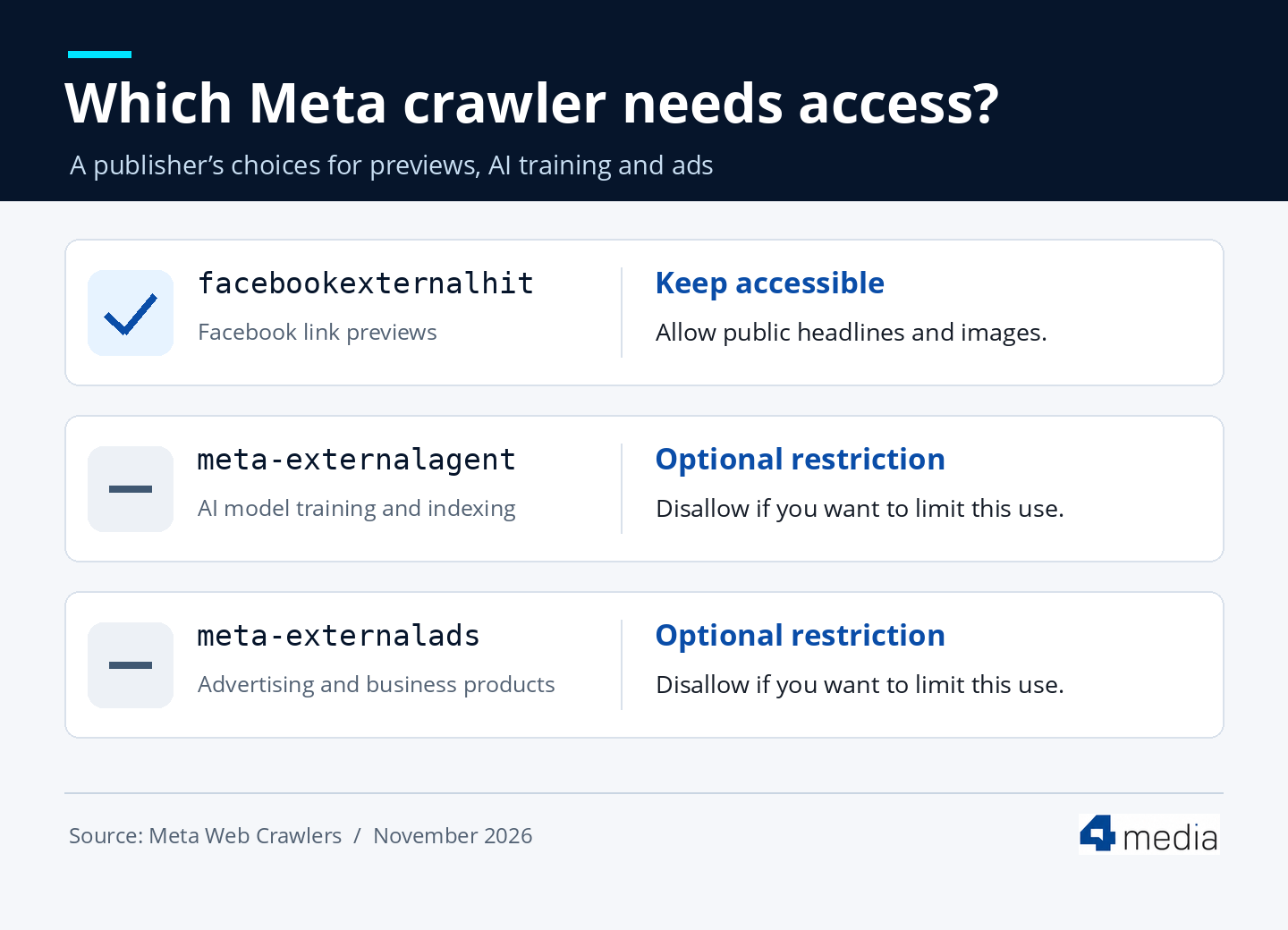
If your policy is to exclude the training and ads crawlers across your site, use the following entries in your existing /robots.txt. Check first for rules already assigned to either name. Leave the preview crawler’s access to the public headline and image in place.
User-agent: meta-externalagent
Disallow: /User-agent: meta-externalads
Disallow: /
After saving, test a public story in Facebook’s Sharing Debugger and ask your host to check the requests in its logs. Meta says crawlers may cache robots.txt for up to 24 hours. It also identifies two exceptions: meta-externalfetcher may bypass the file when a user requests a link, and facebookexternalhit may do so for security checks. If you want your server to refuse requests from selected crawlers, ask your host to configure a targeted rule. For subscriber-only reporting, test the paywall separately: a logged-out request should receive only the portion you intend to make public. Facebook Sharing Debugger · The robots.txt standard on access control.
Where to change robots.txt in CMS4media
In the ADS4media panel, open cms4media portals → Edit → Settings and find the robots.txt field. If you manage several titles, the bulk editor lets you append rules to selected portals under the active company profile. Appending preserves each paper’s existing entries, including its sitemap address. Check the live file on each selected domain after saving. 4media’s illustrated setup guide · Bulk editing guide.
Evaluating a CMS for your newspaper or group? Bring one article URL to a conversation with 4media. Ask us to show you where you would change its site’s crawler rules and how you would check that readers can still share the story on Facebook. Talk to the CMS4media team.